• Call Support 86-0596-2628755

Why Choose a Computer Table for Your Workspace?

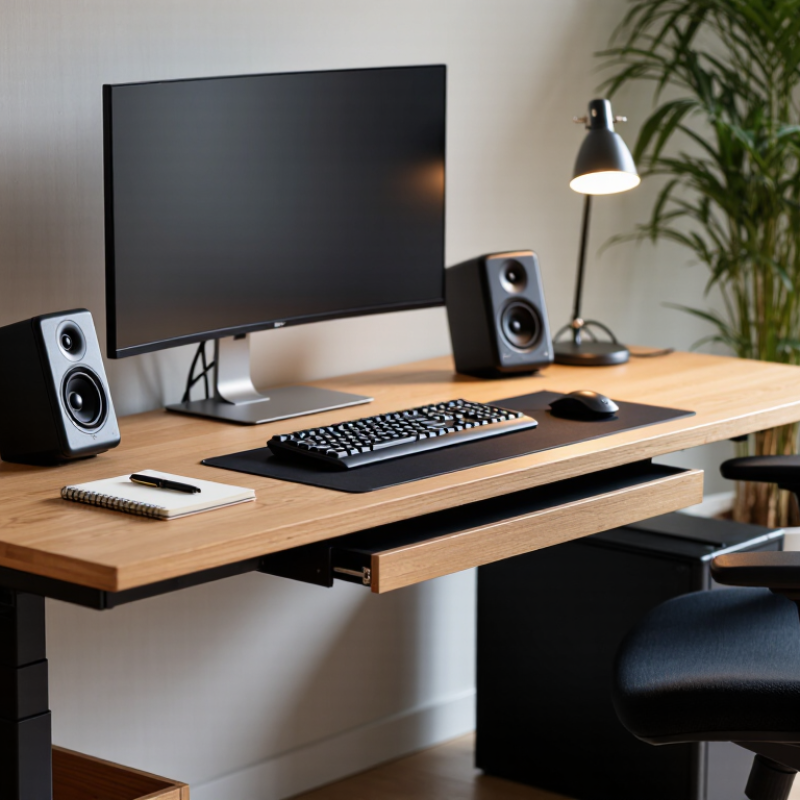
A workspace can look polished and still feel uncomfortable after two hours. The right Computer Table connects your screen, chair, lighting, and daily habits. It gives each item a defined place. Your monitor can sit at eye level. Your keyboard can remain close to your elbows. Cables can stay behind the rear panel instead of crossing your knees.

Dr. Alan Hedge, a respected workplace ergonomics researcher, offers a useful principle: “The ideal posture is a dynamic posture.” A well-designed Computer Table supports movement rather than forcing one rigid position. Adjustable height, adequate legroom, and a stable surface can reduce unnecessary reaching. A slide-out keyboard tray may help some users. Others may find it restrictive. Personal fit matters.

Real experience also reveals an awkward truth. A larger table does not automatically create a better workspace. I have seen wide desktops become storage zones within weeks. That failure usually reflects poor organization, not poor furniture. A practical Computer Table should match your equipment and working style. Measure the monitor, keyboard, speakers, and chair before buying. Leave space for a notebook or a small lamp. Consider rounded edges, durable finishes, and simple cable management. These details feel minor at first. They become important every day.

Choosing carefully can improve comfort, concentration, and visual order. It cannot replace movement breaks or thoughtful posture. Still, a suitable Computer Table creates a stronger foundation for productive work. The best choice is not the most expensive one. It is the table that quietly supports your real routine.
Why Choose a Computer Table for Your Workspace?

Definition and Purpose of a Computer Table

A computer table is a dedicated surface designed to support a monitor, keyboard, mouse, and related equipment. Its purpose is not simply to hold a computer. It creates an organized work zone where posture, visibility, and movement can be managed more carefully. Many computer tables include cable openings, storage shelves, or a sliding keyboard tray. These details can reduce clutter around your hands and feet.

In my experience, a suitable table makes long work sessions feel less demanding. A desk height near elbow level helps keep the shoulders relaxed while typing. The monitor should sit directly ahead, with its top edge near eye level. Leave enough depth for the screen and a comfortable viewing distance. I once chose a narrow table because it looked neat. My wrists felt cramped after several hours. The design was attractive, but the working space was insufficient. That mistake changed how I judge furniture.

Tips

Measure your chair before buying a table. Your knees should fit comfortably beneath the desktop. Keep frequently used items within easy reach. Avoid placing the monitor beside a bright window, where reflections can cause eye strain. Check whether the surface remains stable when typing. A small wobble becomes surprisingly distracting. Leave space for cable movement, too. I still overlook this detail sometimes. A tidy appearance does not always mean good function.
Key Features That Support Efficient Computer Use

A computer table is more than a flat surface for a monitor and keyboard. Its design can shape how comfortably and efficiently you work each day. In my own workspace, a table with enough depth kept the screen about an arm’s length away. This reduced neck movement and made reading feel less tiring. Small details matter. A smooth, rounded front edge also prevented pressure on my wrists during long typing sessions.

Effective computer tables usually include practical cable management, stable legs, and a surface that resists daily wear. A rear cable opening can keep chargers away from your knees and reduce desk clutter. Adjustable height is useful when users change between sitting and standing. However, adjustment alone does not guarantee comfort. The monitor, chair, and keyboard must still work together. I once focused heavily on storage and ignored legroom. It felt awkward. Drawers can hold notebooks and accessories, but they should not block natural movement. Measure twice.

A reliable table should also support the equipment placed on it without shaking. Check its stated load capacity, surface thickness, and assembly instructions before buying. A matte finish may reduce harsh reflections near a bright window. Ventilation space beneath the desk can help prevent cramped legs and tangled cables. These features support efficient computer use, but personal habits remain important. Even the best table cannot replace regular breaks, a neutral wrist position, and sensible screen placement.

How a Computer Table Improves Workspace Organization

Why Choose a Computer Table for Your Workspace?

A computer table gives every essential item a defined home. The monitor stays centered, while the keyboard, notebook, and lamp remain within reach. This simple layout reduces visual clutter and makes daily tasks easier to repeat.

Research from the International Data Corporation estimates that workers can spend about 2.5 hours daily searching for information. A structured table cannot solve every productivity problem, but it can reduce unnecessary searching around the desk.

Workspace organization also supports safer computer use. The Occupational Safety and Health Administration recommends placing the monitor at a comfortable height, keeping frequently used objects nearby, and allowing enough legroom. A suitable computer table makes these adjustments more practical.

The 2023 Bureau of Labor Statistics report recorded more than 888,000 nonfatal workplace injury and illness cases involving days away from work. Not all were desk-related, of course. Still, awkward posture and cramped furniture deserve attention.

Small details matter. A cable tray prevents wires from sliding across the floor. A shallow drawer keeps chargers from becoming a tangled pile. Leave some empty space. An overloaded surface can look organized for one day, then fail under real work pressure.

I have found that a table with fewer storage compartments often encourages better decisions. The ideal setup is not perfectly tidy. It is easy to reset after a busy afternoon.

Choosing the Right Size, Materials, and Design

Why Choose a Computer Table for Your Workspace?

Choosing the right computer table starts with size. Measure the monitor, keyboard, chair movement, and cable path before buying. A 120-centimeter-wide surface usually supports one monitor, speakers, and writing space. For two monitors, 140 to 160 centimeters feels less crowded. The Occupational Safety and Health Administration recommends placing the screen directly in front of you, with the top near eye level. A shallow table can force awkward posture. I have made that mistake.

Material affects stability, comfort, and indoor air quality. Solid wood feels warm and resists daily movement, but it can be heavy and costly. Steel frames provide useful rigidity, while laminated panels offer easier cleaning. Check edge sealing and formaldehyde emissions when selecting composite boards. The U.S. Environmental Protection Agency reports that indoor pollutant levels can be two to five times higher than outdoor levels. Ventilation still matters. A moisture-resistant surface is practical if you work with drinks nearby.

Tips: Leave at least 60 centimeters for your knees. Choose adjustable height when several people share the table. Keep monitor cables away from your feet. Look for recognized furniture safety testing, not just attractive photographs. BIFMA’s durability standards evaluate stability, strength, and repeated-use performance, although compliance does not guarantee perfect comfort. Design also needs honesty: open shelves look convenient, yet they collect dust. Measure your room twice. A beautiful table can still make a poor workspace.

Why Choose a Computer Table for Your Workspace? - Choosing the Right Size, Materials, and Design

Table Type Typical Dimensions
(W × D × H)
Work Surface Area Common Materials Design Characteristics Best For Typical Weight Capacity
Compact Computer Table 80–100 × 45–60 × 72–76 cm 0.36–0.60 m² Engineered wood, steel frame, laminate surface Small footprint, integrated shelf or cable opening Small bedrooms, apartments, and occasional laptop use Approximately 40–60 kg
Standard Workstation 120–140 × 60–75 × 72–76 cm 0.72–1.05 m² Solid wood, engineered wood, powder-coated steel Balanced legroom, monitor space, drawers, and cable management Daily work, study, and one-monitor setups Approximately 60–100 kg
Large Dual-Monitor Desk 150–180 × 70–80 × 72–76 cm 1.05–1.44 m² Thick laminate, solid wood, reinforced metal frame Wide surface, stronger support, monitor-arm compatibility Multitasking, design work, gaming, and dual monitors Approximately 80–120 kg
Corner or L-Shaped Table 140–180 × 120–160 × 72–76 cm 1.68–2.88 m² combined surface Engineered wood, laminate, steel or aluminum frame Uses corner space and separates work zones Home offices, streaming, and equipment-heavy setups Approximately 80–140 kg
Standing or Sit-Stand Table 120–160 × 60–80 × 70–120 cm adjustable 0.72–1.28 m² Laminated wood, steel lifting columns, metal frame Height adjustment, anti-collision features on some models Users who alternate between sitting and standing Approximately 60–100 kg
Executive or Solid-Wood Table 160–200 × 75–90 × 72–76 cm 1.20–1.80 m² Solid wood, wood veneer, steel or wood legs Thicker top, formal appearance, spacious storage Permanent offices and users needing substantial desk space Approximately 100–150 kg

Note: Dimensions and load capacities are typical ranges. Always verify the manufacturer’s specifications, wall clearance, legroom, and floor space before purchase.

Factors to Consider Before Buying a Computer Table

Choosing a computer table starts with your daily habits, not its appearance. The 2023 American Time Use Survey from the U.S. Bureau of Labor Statistics reports that employed Americans worked an average of 8.1 hours on weekdays. That is a long time beside one surface. Measure your monitor, keyboard, speakers, and writing area together. Then add several centimeters for comfortable movement. Measure twice. A 120-centimeter table may look generous, but a deep monitor stand can quickly consume usable space.

Ergonomics deserves careful attention. The Occupational Safety and Health Administration recommends placing the monitor directly in front of you, with the top at or slightly below eye level. Choose a table with enough depth for that viewing distance, usually around 60 to 80 centimeters for a typical home setup. Adjustable height can help different users, but stability matters more than a complicated mechanism. Posture matters. I once focused on legroom and underestimated cable space; the result was a crowded floor and awkward cleaning.

Before buying, check the table’s load rating, frame construction, edge finish, and assembly instructions. A heavy desktop computer, monitor arm, and speakers can strain a lightweight surface. The European Agency for Safety and Health at Work identifies musculoskeletal disorders as one of the most common work-related health problems in Europe, reinforcing the value of practical workstation design. Look for rounded front edges, strong rear support, and a cable opening that matches your equipment. Budget should include a suitable chair and monitor support, not only the tabletop. A beautiful table can still fail if it wobbles.