• Call Support 86-0596-2628755

7 Best TV Stands for Every Space and Budget?

A good TV setup should feel comfortable, not crowded. Yet finding the right Tv Stand can be harder than it looks. A stand must support your screen, suit your room, and hold the items you actually use. It should also fit your budget without making everyday viewing feel like a compromise.

Small apartments often need slim consoles with doors or shelves for cables and remotes. Larger rooms may benefit from wider cabinets that balance a big television and add useful storage. Measure the wall, screen width, and walking space before comparing styles. Check the stand’s stated weight capacity and recommended television size, since appearance alone cannot confirm a safe fit. Consider ventilation too, especially if game consoles or streaming devices sit inside closed compartments.

Looks matter. So does assembly. Materials, cable openings, adjustable shelves, and cleaning needs can affect how practical a model feels after the first week. A glossy finish may show fingerprints; open shelving can make wires more visible. No stand is perfect. This guide compares seven options across room sizes, features, and price ranges, focusing on practical trade-offs rather than one-size-fits-all claims. Use it to narrow your choices, then verify current dimensions and product details before buying. That final check can prevent a frustrating return.
7 Best TV Stands for Every Space and Budget?

Understanding TV Stand Types and Their Best Uses

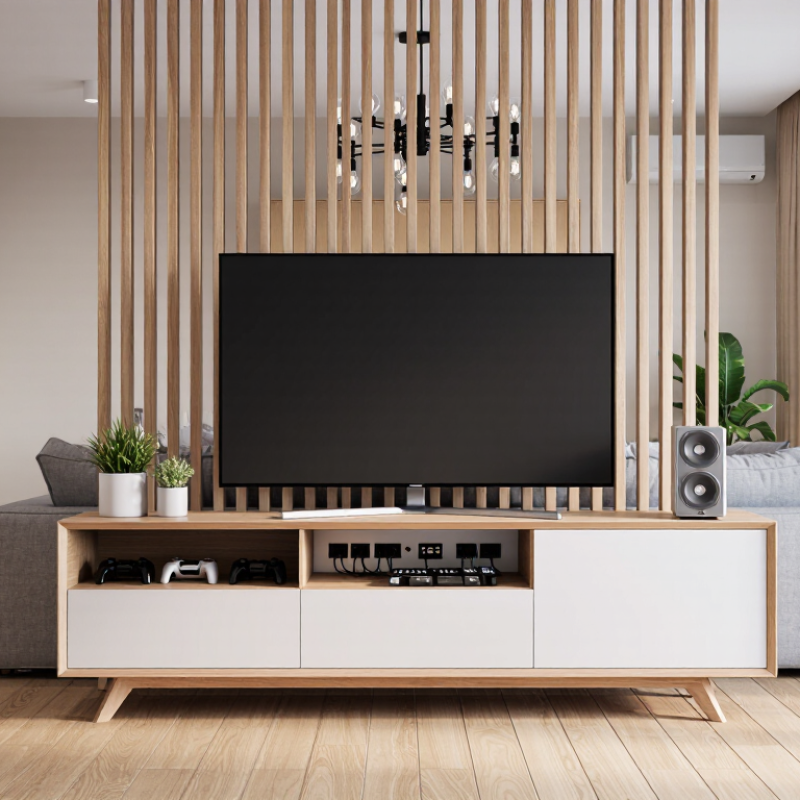
TV stands vary in shape, storage, and installation, so the right type depends on the room and how you use it. A low console suits many living rooms, keeping the screen near seated eye level while offering shelves for a game system or remote controls. Measure the wall and television first. A stand that looks compact online may feel bulky beside a narrow sofa.

Open-shelf designs keep devices easy to reach and allow airflow around warm electronics. They work well when you regularly connect consoles, speakers, or media players. The trade-off is visible cables and dust. Closed cabinets hide clutter, but check for ventilation openings and enough interior depth before buying. Small detail, big difference.

Corner stands can make use of awkward floor space in smaller rooms, though their shape may limit storage. Wall-mounted units free up the floor and create a lighter look, but they require secure installation and careful cable planning. A swivel mount can help when seating is spread across the room. It may also add visual bulk.

For bedrooms, a narrow, taller stand can suit a higher viewing position, but comfort varies with bed height. There is no perfect type for every home; even a well-measured choice may need rearranging once the television is in place.
Choosing the Right TV Stand for Your Room Size

Choosing a TV stand starts with a tape measure, not a catalog. Measure the wall, then account for door swings, baseboards, and nearby shelves. SMPTE’s 30-degree horizontal viewing-angle guidance offers a useful benchmark: for a 16:9 screen, viewing distance is about 1.6 times the screen’s diagonal. A 55-inch TV, for example, suits a distance of roughly 7.3 feet. Treat that as a reference, not a rule; eyesight and viewing habits vary. Measure twice.

Make sure the stand is wider than the TV’s feet, and deep enough to support them fully. A little extra space at each end helps prevent a crowded look. In a compact room, a shallow, open stand can preserve sightlines and walkway space. In a larger room, a longer unit may anchor the screen, but an oversized cabinet can dominate the wall. Check the full dimensions, including knobs and cable bends. It is easy to misjudge. Leave ventilation space around electronics, and compare the stand’s load rating with the weight of the TV and accessories. For tall furniture, consider anchoring it, especially in homes with children. I might still underestimate how bulky a stand feels once it is in place. A room photo can hide that.

7 Best TV Stands for Every Space and Budget? — Choosing the Right TV Stand for Your Room Size

Choose a stand at least 8 inches wider than your TV screen—about 4 inches of extra space on each side. Widths shown are estimates for 16:9 TVs; check your TV’s actual dimensions and allow for its feet or mounting setup.

Comparing the Seven Best TV Stands by Budget

A useful seven-stand comparison starts with three spending bands: under $100, $100–$250, and above $250. These are practical shopping ranges, not official industry price categories. In the lowest band, expect compact open shelves or lightweight engineered wood. They suit small rooms and modest screens, but check the listed weight capacity before placing a television on top. A wobbly frame is a poor bargain. Between $100 and $250, shoppers can often find sturdier cabinets, cable openings, and doors that hide consoles. Measure the wall and the stand, including its depth; a cabinet can look slim online and still crowd a narrow walkway.

Above $250, compare solid construction, adjustable shelving, ventilation, and storage that fits your actual devices. Extra drawers are useful only if cables and equipment still have room to breathe. The Consumer Technology Association’s 2024 U.S. forecast estimated consumer technology retail revenue at $512 billion. That figure covers a broad electronics market, not TV stands, so it cannot prove which stand price is best. It does, however, put furniture choices alongside a major household technology purchase. For any budget, check assembly details, return terms, and the manufacturer’s stated load limit. Leave space around the television and components. I would not pay more for finish alone; a careful measurement may matter more.

7 Best TV Stands for Every Space and Budget — Comparing the Seven Best TV Stands by Budget Seven common TV-stand styles compared by typical price, size, storage, and practical use.
Stand type Typical price (USD) Approx. width Typical TV size Materials and storage Assembly Best for
1. Compact open-shelf stand $30–$75 24–36 in 32–43 in Usually laminated engineered wood or metal; one or two open shelves. Usually required; basic tools and straightforward assembly. Small rooms, bedrooms, and budget setups with a few devices.
2. Basic engineered-wood console $60–$130 40–55 in 43–55 in Typically particleboard or MDF with a laminate finish; often combines shelves and enclosed cubbies. Usually required; allow time to assemble panels and hardware. Everyday living rooms where affordable storage is a priority.
3. Corner TV stand $70–$160 32–46 in 32–50 in Commonly engineered wood; angled or triangular back helps it sit in a corner, with shelves or cabinets. Usually required; positioning and assembly can take extra care. Rooms with limited wall space or a layout that suits corner placement.
4. Midrange storage console $120–$250 48–60 in 50–65 in Often engineered wood with a veneer or laminate finish; typically includes cabinets, drawers, or adjustable shelves. Usually required; more parts than a basic open stand. Living rooms needing a balance of concealed storage and price.
5. Large closed-door cabinet $180–$350 55–70 in 55–75 in Commonly engineered wood; doors help conceal equipment, games, and accessories. Usually required; larger pieces may be easier to assemble with two people. Family rooms where tidy, concealed storage matters.
6. Solid-wood console $300–$700 48–72 in 50–75 in Made partly or wholly from solid wood; storage varies from open shelves to drawers and doors. May arrive partly assembled; heavier models can require two-person handling. Buyers prioritizing natural materials and long-term furniture use.
7. Premium modular or extra-wide unit $500–$1,200+ 70–90+ in 65–85+ in May combine wood, metal, glass, or finished panels; modular layouts can provide extensive storage. Assembly and installation vary; large units may need wall anchoring. Large screens, wide rooms, and setups that need substantial storage or a coordinated look.

Price and size figures are broad, indicative ranges for common stand styles, not specifications for a particular product. Before buying, check the stand’s maximum weight capacity, the TV’s feet or mounting pattern, cable access, and the manufacturer’s assembly and anchoring instructions.

Evaluating Storage, Materials, Style, and Stability

A TV stand should support more than a screen; it must suit the room and hold its weight safely. Check the stand’s stated weight limit, then compare it with your television’s weight. Leave a little extra width on each side to reduce the risk of bumps knocking the screen. Solid wood can feel reassuringly sturdy, while engineered panels often cost less and come in many finishes. Inspect the joints and back panel, not just the surface. Looks can mislead. Measure twice.

Storage needs depend on what you actually keep nearby. Open shelves make game consoles easy to reach, but they also show every cable and collect dust. Cabinets hide clutter, though doors need space to open and enclosed electronics need enough airflow. Measure your devices before choosing a shelf; a console that fits on paper may feel cramped beside its cords. Drawers work well for remotes and manuals, but they do little for ventilation.

Style and budget should follow those practical checks, not replace them. A low, simple stand can make a small room feel less crowded, while a taller cabinet may add useful storage in a compact apartment. Compare finishes in the room’s natural light; warm wood tones can look cooler near a bright window. Cheaper models may wobble on uneven floors, so check whether the feet adjust. That detail is easy to overlook, and I’d still want to test it in person.

Matching a TV Stand to Your Space and Viewing Needs

A TV stand should fit the room, not just the screen. Measure the television’s width, then choose a stand wider than its feet for a stable, balanced look. Measure twice. In a narrow apartment, a shallow cabinet can preserve walking space; in a larger room, a wider unit may help anchor the seating area. Leave room for doors and drawers to open, and keep vents clear so electronics can release heat.

Viewing height matters, too. Sit in your usual spot and check whether the center of the screen sits near eye level. A stand that is too tall can make long viewing sessions uncomfortable. There is no perfect height for every sofa, though, and cushions compress over time. A small difference can be worth testing before you buy. Check the distance between the stand and seating as well; a huge screen in a compact room may feel overwhelming.

Think about what the stand needs to hold: a game console, a sound system, or a few baskets for cables and remotes. Open shelves make devices easy to reach but show dust and clutter. Closed doors create a calmer look, yet some equipment needs airflow and a clear signal path. Measure your devices, including their cables. That detail is easy to miss. Choose a finish that works with the room’s light and furniture, but prioritize stability, usable storage, and a secure fit over a perfect match.